> ## Documentation Index
> Fetch the complete documentation index at: https://docs.slng.ai/llms.txt
> Use this file to discover all available pages before exploring further.
# Bring your own key
> Run a model on your own provider account while the request still flows through SLNG.
Bring your own key (BYOK) runs a model on your own provider account instead of an
SLNG-hosted one. The request still flows through the SLNG Execution Layer, so
routing, fallbacks, and caching work the same way; only the model runs on your
account. You register the provider key once, and it is available to every project
in your organisation.
## When to use your own key
Prefer an SLNG-hosted model where one exists: it runs in your region and skips the
hop to an outside provider, which is the lowest-latency path. Reach for your own
key when one of these applies:
* **Provider relationship.** You already have contracts, pricing, or quota with
the provider that you want to keep using.
* **Coverage.** A model or voice you need is not SLNG-hosted in your region.
* **Procurement or compliance.** The provider account must stay in your name.
A BYOK route leaves SLNG for your provider, so its latency depends on that
provider and its region, not on your SLNG region.
Need a model or provider that is not an SLNG model or available through BYOK?
Email [support@slng.ai](mailto:support@slng.ai) and we will look at adding it.
## Register a key
You register a provider key once, scoped to your organisation, so every project
can use it. For speech, BYOK covers the providers the vault lists; a model from
any other provider runs SLNG-hosted. For LLMs you register a custom model of your
own, so you are not limited to a list. See
[Add a custom LLM model](#add-a-custom-llm-model).
In your project, go to **Project Vault**, then **BYOK**. The page splits into
**Speech models** and **LLM providers**. Click **Manage in SLNG Vault**.
 The organization vault opens on **SLNG Vault → BYOK**, with the same **Speech
models** and **LLM providers** tabs. Click **Add key**.
The organization vault opens on **SLNG Vault → BYOK**, with the same **Speech
models** and **LLM providers** tabs. Click **Add key**.
 Set the **Type** (speech to text, text to speech, or LLM), then pick the
**Model**. The **API key** field appears once a model is selected. Paste the
key from your provider's dashboard, leave **Apply to** on **Organisation** so
every project can use it, and click **Add key**. The key is stored encrypted
and used automatically whenever that model is selected.
Set the **Type** (speech to text, text to speech, or LLM), then pick the
**Model**. The **API key** field appears once a model is selected. Paste the
key from your provider's dashboard, leave **Apply to** on **Organisation** so
every project can use it, and click **Add key**. The key is stored encrypted
and used automatically whenever that model is selected.
 The key now shows up on the BYOK page and in the **BYOK** tab of each model
dropdown on **Listen**, **Think**, and **Speak**. Pick that model and the agent
uses your key.
## Add a custom LLM model
The **LLM providers** tab is open: you register any provider endpoint rather than
picking from a list. The model runs on your provider account, and the
[Context Router](/guides/execution-layer/llm/context-router) routes to it.
In the [BYOK vault](https://app.slng.ai/byok-models), open the **LLM
providers** tab and click **Add key**.
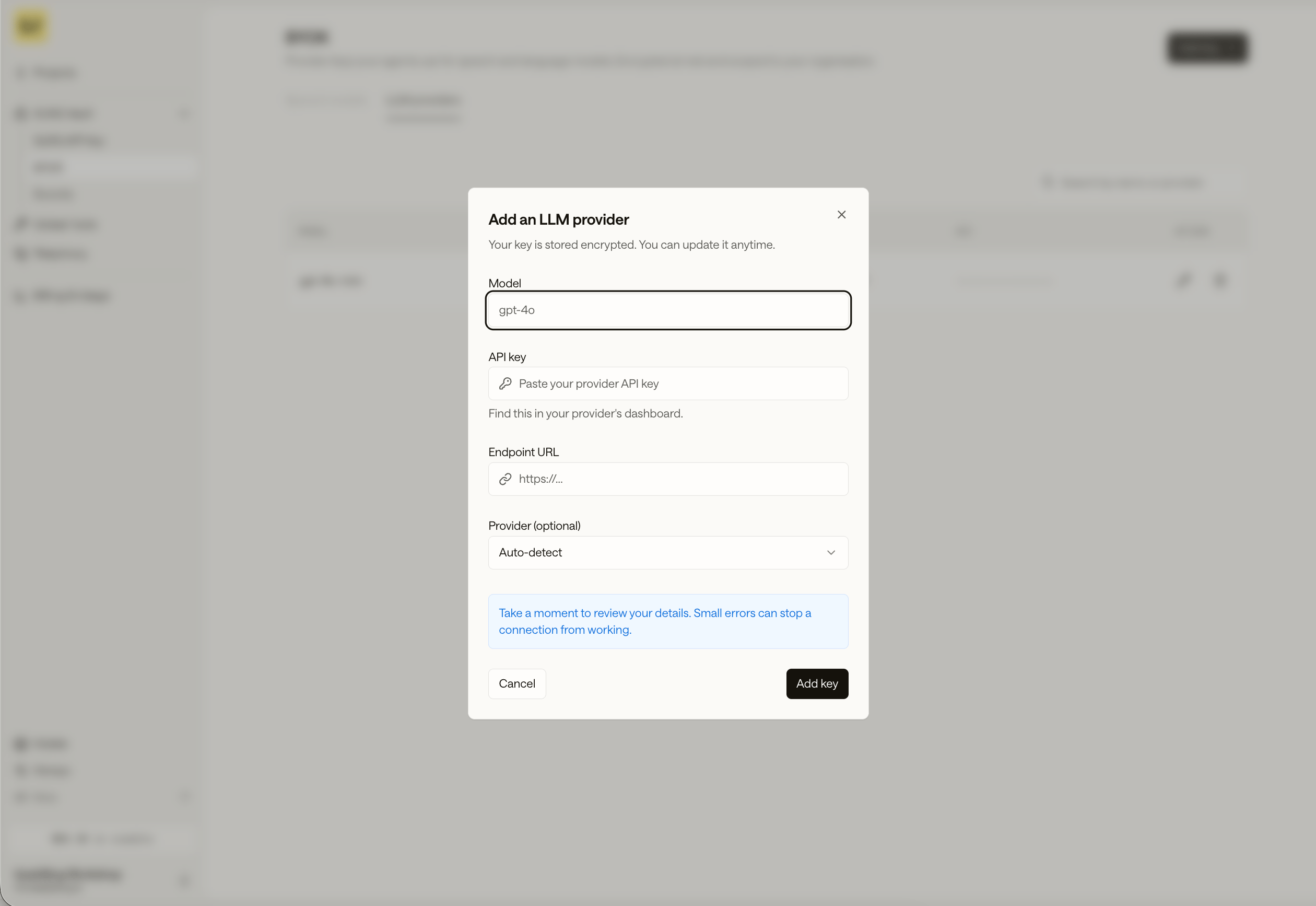
In **Add an LLM provider**, enter:
* **Model**: the model name your provider expects, such as `gpt-4o`.
* **API key**: your provider key, from the provider's dashboard.
* **Endpoint URL**: the provider's base URL.
* **Provider** (optional): leave it on **Auto-detect**, or pick the provider.
Click **Add key**. The key is stored encrypted, and you can update it anytime.
The key now shows up on the BYOK page and in the **BYOK** tab of each model
dropdown on **Listen**, **Think**, and **Speak**. Pick that model and the agent
uses your key.
## Add a custom LLM model
The **LLM providers** tab is open: you register any provider endpoint rather than
picking from a list. The model runs on your provider account, and the
[Context Router](/guides/execution-layer/llm/context-router) routes to it.
In the [BYOK vault](https://app.slng.ai/byok-models), open the **LLM
providers** tab and click **Add key**.
In **Add an LLM provider**, enter:
* **Model**: the model name your provider expects, such as `gpt-4o`.
* **API key**: your provider key, from the provider's dashboard.
* **Endpoint URL**: the provider's base URL.
* **Provider** (optional): leave it on **Auto-detect**, or pick the provider.
Click **Add key**. The key is stored encrypted, and you can update it anytime.
 The model appears in the **BYOK** tab of the **Think** section's LLM dropdown.
Pick it and the agent routes to your model.
For the full set of provider options (Azure, Vertex, custom auth headers, and
fallbacks), see [Create a client model](/api-reference/agents-resources/client-models/create).
## Use a BYOK model in code
Model IDs name where the model runs:
| Route | Runs on |
| ----------------------------------- | ------------------------------------------- |
| `slng/deepgram/nova:3-en` | SLNG infrastructure, in your region |
| `deepgram/nova:3` | The provider, through SLNG. No key required |
| `deepgram/nova:3` + your credential | The provider, on your own account (BYOK) |
Supply a BYOK credential one of two ways, and never attach one to an `slng/` model:
* **Registered credential (recommended).** A key stored in the vault is resolved
automatically. Managed agents just select the model; direct calls send only
`Authorization: Bearer $SLNG_API_KEY`.
* **Per-request header (direct model calls).** Send `X-Slng-Provider-Key` with
`X-Slng-Agent-Id` and `X-Slng-Session-Id`, which are required. Managed agents
never send this header.
## Next steps
* [Which models are available](/guides/models/which-models-are-available)
* [Configure Listen](/guides/agents/configure/listen),
[Think](/guides/agents/configure/think), and
[Speak](/guides/agents/configure/speak)
The model appears in the **BYOK** tab of the **Think** section's LLM dropdown.
Pick it and the agent routes to your model.
For the full set of provider options (Azure, Vertex, custom auth headers, and
fallbacks), see [Create a client model](/api-reference/agents-resources/client-models/create).
## Use a BYOK model in code
Model IDs name where the model runs:
| Route | Runs on |
| ----------------------------------- | ------------------------------------------- |
| `slng/deepgram/nova:3-en` | SLNG infrastructure, in your region |
| `deepgram/nova:3` | The provider, through SLNG. No key required |
| `deepgram/nova:3` + your credential | The provider, on your own account (BYOK) |
Supply a BYOK credential one of two ways, and never attach one to an `slng/` model:
* **Registered credential (recommended).** A key stored in the vault is resolved
automatically. Managed agents just select the model; direct calls send only
`Authorization: Bearer $SLNG_API_KEY`.
* **Per-request header (direct model calls).** Send `X-Slng-Provider-Key` with
`X-Slng-Agent-Id` and `X-Slng-Session-Id`, which are required. Managed agents
never send this header.
## Next steps
* [Which models are available](/guides/models/which-models-are-available)
* [Configure Listen](/guides/agents/configure/listen),
[Think](/guides/agents/configure/think), and
[Speak](/guides/agents/configure/speak)