Run a model on your own provider account while the request still flows through SLNG.
Bring your own key (BYOK) runs a model on your own provider account instead of an
SLNG-hosted one. The request still flows through the SLNG Execution Layer, so
routing, fallbacks, and caching work the same way; only the model runs on your
account. You register the provider key once, and it is available to every project
in your organization.
Prefer an SLNG-hosted model where one exists: it runs in your region and skips the
hop to an outside provider, which is the lowest-latency path. Reach for your own
key when one of these applies:
Provider relationship. You already have contracts, pricing, or quota with
the provider that you want to keep using.
Coverage. A model or voice you need is not SLNG-hosted in your region.
Procurement or compliance. The provider account must stay in your name.
A BYOK route leaves SLNG for your provider, so its latency depends on that
provider and its region, not on your SLNG region.
Need a model or provider that is not an SLNG model or available through BYOK?
Email support@slng.ai and we will look at adding it.
You register a provider key once, scoped to your organization, so every project
can use it. For speech, BYOK covers the providers the vault lists; a model from
any other provider runs SLNG-hosted. For LLMs you register a custom model of your
own, so you are not limited to a list. See
Add a custom LLM model.
1
Open the BYOK vault
In your project, go to Project Vault, then BYOK. The page splits into
Speech models and LLM providers. Click Manage in SLNG Vault.
Project Vault, BYOK. Open Manage in SLNG Vault.
2
Add a key in the organization vault
The organization vault opens on SLNG Vault → BYOK, with the same Speech
models and LLM providers tabs. Click Add key.
The organization BYOK vault. Click Add key.
3
Choose a model and paste your key
Set the Type (speech to text, text to speech, or LLM), then pick the
Model. The API key field appears once a model is selected. Paste the
key from your provider’s dashboard, leave Apply to on Organisation (default) so
every project can use it, and click Add key. The key is stored encrypted
and used automatically whenever that model is selected.
After you pick a model, the API key field appears. Paste your provider key.
4
Select it on your agent
The key now shows up on the BYOK page and in the BYOK tab of each model
dropdown on Listen, Think, and Speak. Pick that model and the agent
uses your key.
The LLM providers tab is open-ended: you register any provider endpoint rather
than picking from a list. The model runs on your provider account, and the
Context Router routes to it.
1
Open the LLM providers tab
In the BYOK vault, open the LLM
providers tab and click Add key.
2
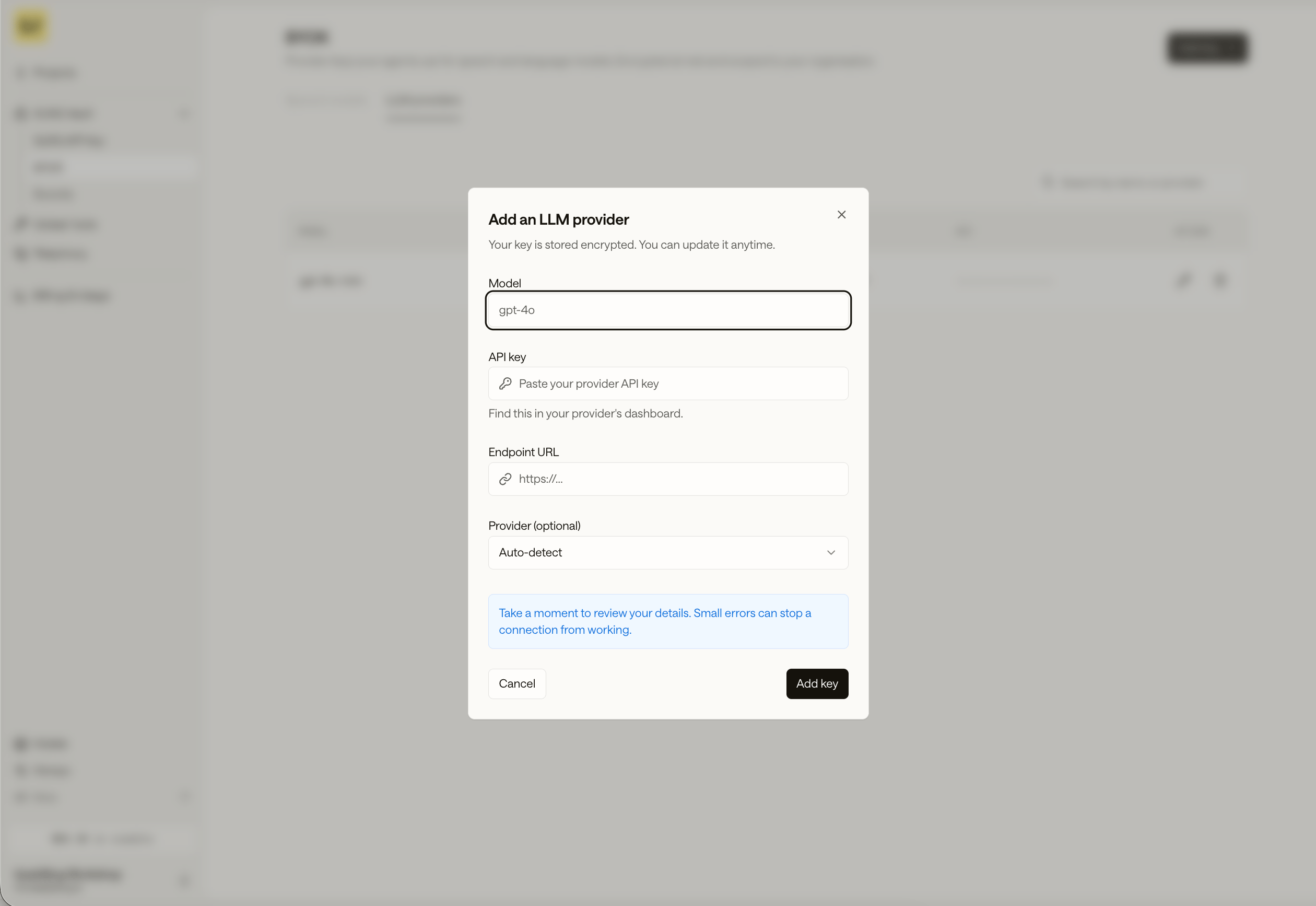
Fill in the model details
In Add an LLM provider, enter:
Model: the model name your provider expects, such as gpt-4o.
API key: your provider key, from the provider’s dashboard.
Endpoint URL: the provider’s base URL.
Provider (optional): leave it on Auto-detect, or pick the provider.
Click Add key. The key is stored encrypted, and you can update it anytime.
The Add an LLM provider dialog: model, API key, endpoint URL, and an optional provider.
3
Select it on your agent
The model appears in the BYOK tab of the Think section’s LLM dropdown.
Pick it and the agent routes to your model.
Model IDs name where the model runs. A BYOK model uses the bare provider route,
such as deepgram/nova:3, with your credential attached. For every route, see
Where a model can run.Supply a BYOK credential one of two ways, and never attach one to an slng/ model:
Registered credential (recommended). A key stored in the vault is resolved
automatically. Managed agents just select the model; direct calls send only
Authorization: Bearer $SLNG_API_KEY.
Per-request header (direct model calls). Send X-Slng-Provider-Key with
X-Slng-Agent-Id and X-Slng-Session-Id, which are required. Managed agents
never send this header.